
All guides
Placements
A placement is a single link on a publisher's website. This guide covers every placement status, what the verification badge means, and how to check a live link.
The Placements Page
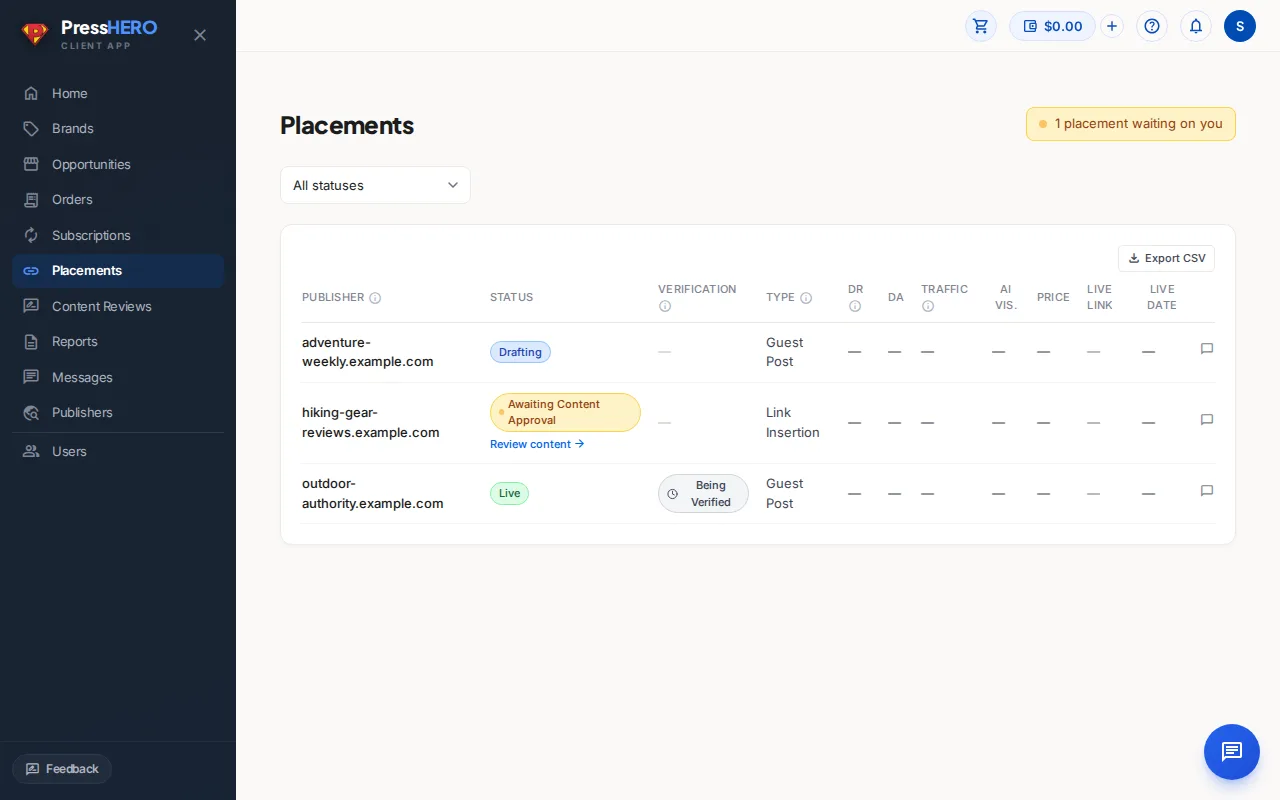
The Placements page in the sidebar lists every link in your campaign — from the moment it's confirmed right through to the moment it goes live.
Each row shows the publisher domain, the current status, a verification badge (once live), the link type, DR, organic traffic, price, and the live URL. If any placements need your input, an amber notice appears at the top of the page.
Click any row to expand it and view the comment thread for that placement, where you and your account team can leave notes.
Placement Statuses
Every placement moves through a defined lifecycle. Here's what each status means:
| Status | What it means |
|---|---|
| Planned | Our team has confirmed the placement and is beginning outreach. |
| Drafting | Content is being written for this placement. |
| Ready for Your Review | The article draft is complete and waiting for your approval. |
| Submitted to Publisher | The content has been sent to the publisher and is awaiting publication. |
| Live | Your link is published on the publisher's website. |
| Issue — Being Fixed | A problem was found with the link (e.g. it went missing). Our team is working to fix it. |
| Selecting New Site | The publisher declined this placement, so we're finding a replacement site. Depending on the options available, you may be asked to choose between a few sites — watch for a "Choose Your New Site" status if we need your input. |
| Dropped | The placement was cancelled. Your account manager can explain why and suggest alternatives. |
| Choose Your New Site | We've found one or more replacement sites for this placement. Review the options and pick the one you'd like — your account manager can help if you're not sure. |
| Replaced by another site | This placement was replaced by a new site (the status shows the actual domain). Click through to see the new placement's own status. |
| Not Fulfilled | The publisher declined this placement and no replacement site was available. Your account manager can explain next steps. |
Verification Badges
Once a placement is Live, a verification badge appears in the Verification column. Our link monitor checks three things automatically:
- Link present — your link was found on the publisher page.
- Follows SEO agreement — the link uses the correct attributes (dofollow, as agreed).
- Indexable — the page is not blocked from search engine crawlers.
Click the badge to see the detailed breakdown. There are three states:
- Verified ✓ (green) — all three checks passed.
- Being Verified (grey) — the check hasn't run yet or is still in progress.
- Issue Found — Being Fixed (red) — one or more checks failed. Our team has been alerted and will resolve it.
Filtering, Sorting, and Columns
The Placements table can be tailored without losing account-wide accuracy. Its search, filters, and sorting are applied to the full set of placements you can see before the server returns a page.
- Columns — show or hide publisher, status, brand, verification, link type, authority metrics, price, live link, and date columns. Your choices are saved in this browser; the account list and an order's placement table keep separate choices.
- Search and column filters — search across the visible account data or filter individual columns, including status, brand, verification, link type, metrics, price, live URL, and publish date.
- Sorting and pagination — select a sortable column header to order the complete filtered result. Any search, filter, or sort change returns you to page 1 before the new page is loaded.
Use Clear filters to remove the active search, filters, and sort. Export downloads the visible columns from the currently loaded server page; it is not an all-pages export.
Finding Citation Evidence
To review AI-answer citation evidence for published content, go to Reports, open the brand's visibility tracker, and select Placed Content.
The Placements table does not contain citation evidence. The Placed Content view links back to the related placement record or records when you need their campaign details.
Related guides